
If you're having trouble downloading ZIP files, it's usually not because of the application itself, but because of a security or website permission in the Microsoft Edge browser.
Note:
Microsoft Edge blocks the download of compressed files under certain constellations if site permissions have not been clearly set or have previously been rejected. In this case, the download of ZIP files is prevented or not started at all.
You can use the steps below to adjust the required browser setting so that the download works properly.
Adjust browser settings in Microsoft Edge
Step 1: Store FUTURA Smart as an exception
-
Open Microsoft Edge
-
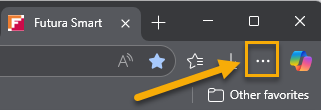
Click on the three dots in the top right corner
-
Select Settings
-
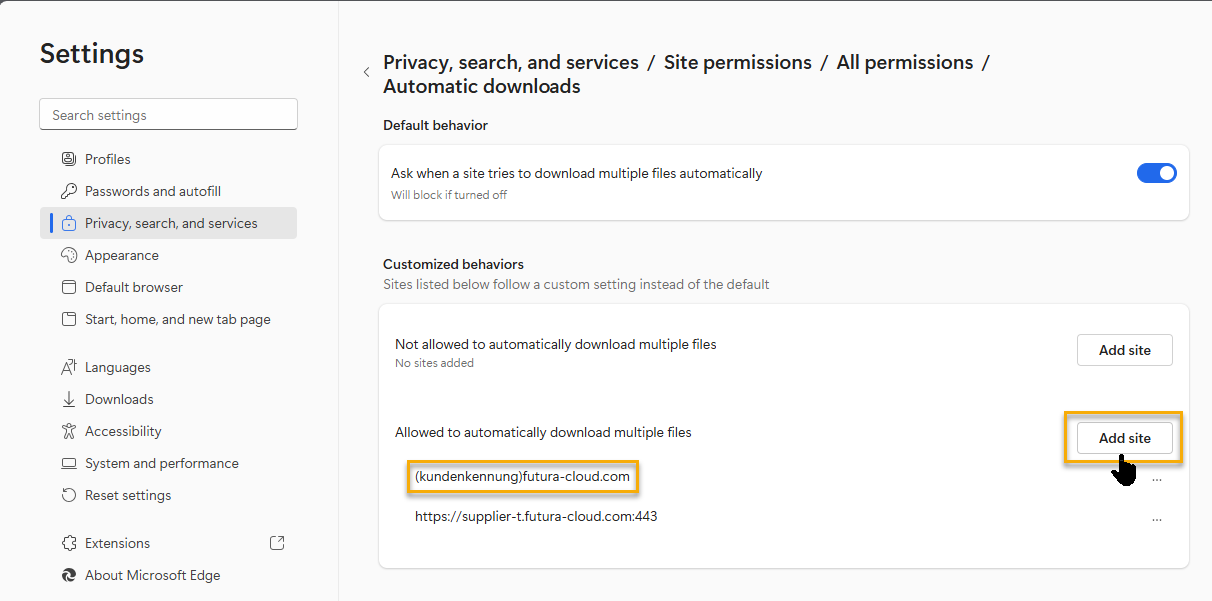
Go to Privacy, Search, and Services
-
Next, choose...
Site permissions →
All permissions →
Automatic downloads -
Add the URL of FUTURA Smart (your company identifier).futura-cloud.com as an allowed exception
After adding the exception, the ZIP download usually works immediately.
Step 2: Restart Microsoft Edge
-
Close all open Microsoft Edge windows
-
Restart Microsoft Edge
Step 3: Open FUTURA Smart again
-
Access FUTURA Smart as usual in Microsoft Edge
-
Login to your account with your login credentials
Note:
The described workaround is known to our support team. If you're still having problems, please contact our support team and refer to this help article.
Questions about FUTURA Smart? You can find many answers to your questions here online in the Support Center. If you do not find what you are looking for on these pages, you can count on our support by e-mail and phone free of charge*:
Phone: +49 611 33 460 560 | Tel. from the USA: 833 657 1575
(Mon-Fri, from 8:00 a.m. to 6:00 p.m. – Central European Time)
E-mail: support@futura-solutions.com
Online: Support Center
(*free of charge: charges may apply for a metered connection via telephone or internet.)